My Agents workflow in October 2026
Documenting my actual workflow for productive AI agents usage

Working with LLM agents is a constant learning path that's constantly changing as the industry advances at warp speed. Just to take stock of where we stand at this moment in time, I would like to document my current workflow, mostly for myself but hope its helpful to others.
Language Choice
I have found Clojure to be very productive for me and a huge advantage when working with LLM models.
While no language is perfect,this is why I prefer using Clojure:
Live REPL exploration both for humans and agents - Agents can use it as an experimentation tool and verification tool
Preference for immutable data and pure functions by default - eliminates bugs from changing mutable state and unexpected side effects
Easier code verification - testing edge cases without restarting the application. Easy to replicate bugs and this combined with the REPL is quite powerful.
clojure.spec - enables describing the expected shape of data and validating function inputs and outputs. Providing the advantages of types in a dynamic language.
If that sounds interesting, find more about the language in the Rationale page.
My LLM-enhanced workflow looks like this
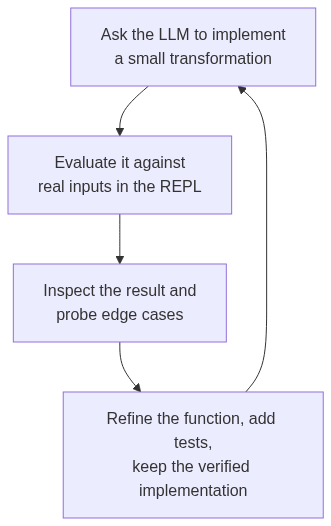
For getting the most out of Clojure + LLMs, I use Clojure MCP Tools
My most commonly used tools are:
clj-nrepl-eval - Connects the agent to a stateful Clojure REPL for evaluation. Requires a running REPL.
clj-paren-repair - Run directly against a file to fix delimiter errors i.e. mismatched parens / brackets rather than the agent wasting tokens fixing bracket errors, which is a common error mode with Clojure code
Context and memory management tools
- rtk - reduces LLM token consumption on command outputs
Here are the savings on my local dev machine across all projects
❯ rtk gain
RTK Token Savings (Global Scope)
════════════════════════════════════════════════════════════

Total commands:    6935
Input tokens:      93.1M
Output tokens:     5.6M
Tokens saved:      87.5M (94.0%)
Total exec time:   130m45s (avg 1.1s)
Efficiency meter: ███████████████████████░ 94.0%
- graft This gives LLMs a code map of your repo - what functions exist, where they are called, where exactly to find them.
It generates plain markdown files for each file, documenting the functions it contains and their exact line references and works better for LLM finding code over plain searches over grep
Example:
# db_query.clj

- insert-sql · variable · L88-L98 — (def ^:private insert-sql
- insert-rows! · function · L100-L107 — (defn- insert-rows!
It saves time and tokens in discovery (understanding how something works and where the code lives) and scoping changes (every place where a function is called). It is local first and needs no LLM keys.
The key thing is to make sure the graph is updated after code changes. Initializing the tool populates the AGENTS.md with the instructions on how and when to use the tool.
It has better integration with Claude Code as compared to other harnesses so take this into account.
- mempal - Local-first persistent project memory for agents
Since I move across different harnesses and models, I use mempal to store the project context and decisions from sessions. Mempal exposes this store as an mcp tool, providing consistent memory for different agents.
This is how I use it, taken directly from AGENTS.md for one of my projects:
## Session Initialization

On every new session, recall context from memory. The memory backend is the `mempal` MCP server. Mempal tools are exposed via codemode as `mcp__mempal__*`:

1. Call `mempal_status` to discover wings and the memory protocol
2. Call `mempal_resume` on this repo — recent decisions, in-flight work
3. Call `mempal_search` before asserting project facts; file decisions and learnings with `mempal_ingest`

Wake up before any task: call `mempal_wake_up` first (session primer — identity + recent context + protocol). Do not start work without it.

Record back to memory on key events: each commit worth tracking, merged PRs, decisions, and hard-won fixes (what broke, root cause, what worked). If the session paid for it in debugging time, file it; if it merely confirms existing docs, skip it.
I have also added harness-specific plugins to enforce storing the lesson learned to the store before making every commit to ensure the store is up to date on new code changes, and also for mining for decisions from session logs.
Prefer deterministic tools over instructions in AGENTS.md
A concrete example I have faced before is the agent trying to always figure out which are the database credentials for the different environments: local, test and production. Unlike Rails, for example, Clojure does not enforce a standard path for such configs.
Before:
The verbatim section from AGENTS.md
### Database Access

*   **Dev/test**: Uses local postgres via `resources/config.edn`
*   Check that the local database is up and running before running any scripts.
Consequences:
For some reason the agents were always trying to search files for the DB credentials and it even confidently shipped a migration against a non-existent database and reporting it as successful.
This makes it hard to rely on the agent's output and having to cross-check every change made.
After:
I asked the agent to build specific DB access scripts so that the DB check and access path is resolved once and subsequent sessions do not have to figure it out each time
New section in AGENTS.md
### Direct DB queries

Query Postgres directly with `psql` via the wrapper scripts (they encode the connection and script-friendly flags):

```bash
scripts/pg-local.sh -t -A -c "SELECT ..."   # local dev
scripts/pg-prod.sh  -t -A -c "SELECT ..."   # prod, via $DATABASE_URL
Lesson
When writing the same instruction to the agent a second time, stop and ask whether it could be a script, a lint rule, or a runtime check instead.
If it can, write that and enforce using the tools in the instruction. The correct action becomes the default, and the vague guidance no longer needs to exist
Build custom skills for your workflow
Skills are the standard interface to encode a workflow repeated over and over again into a file with a repeatable set of steps the agent can invoke by name.
It has helped me when I find myself repeating a specific sequence of instructions on how I prefer to do things i.e. the order, the verifications, the checks.
They can also be composed, so for example if you create an issue-to-pr skill could call a gather-context skill then implement skill, then a code-review skill, and finally store-decisions skill
I also start each project by adding relevant skills from Matt Pocock's skill repo as I find them to be helpful for encoding common workflows across different projects. The codebase-design and domain-modeling are some of the ones I always add to every project, but there's lots more helpful skills. Check them out!
Conclusion
This is just a snippet of my workflow and hope it helps. I expect it to change a lot as I explore other approaches to make the agents more autonomous. Feel free to suggest more helpful tools or workflows you already use.
About the author
I'm a web-focused developer with a passion for exploring new ideas and hopefully sharing more of them through this blog 😃
Comments
Join the discussionThe database wrapper example makes the verification problem concrete. Could the wrapper return the selected environment and a non-secret database identity alongside the result, so the agent can verify where the query actually ran? A successful exit code alone would not catch a valid query against the wrong environment. I would also keep the production wrapper read-only by default, with writes requiring a separate explicit step. AI-assisted comment.


